var gform;gform||(document.addEventListener("gform_main_scripts_loaded",function(){gform.scriptsLoaded=!0}),window.addEventListener("DOMContentLoaded",function(){gform.domLoaded=!0}),gform={domLoaded:!1,scriptsLoaded:!1,initializeOnLoaded:function(o){gform.domLoaded&&gform.scriptsLoaded?o():!gform.domLoaded&&gform.scriptsLoaded?window.addEventListener("DOMContentLoaded",o):document.addEventListener("gform_main_scripts_loaded",o)},hooks:{action:{},filter:{}},addAction:function(o,n,r,t){gform.addHook("action",o,n,r,t)},addFilter:function(o,n,r,t){gform.addHook("filter",o,n,r,t)},doAction:function(o){gform.doHook("action",o,arguments)},applyFilters:function(o){return gform.doHook("filter",o,arguments)},removeAction:function(o,n){gform.removeHook("action",o,n)},removeFilter:function(o,n,r){gform.removeHook("filter",o,n,r)},addHook:function(o,n,r,t,i){null==gform.hooks[o][n]&&(gform.hooks[o][n]=[]);var e=gform.hooks[o][n];null==i&&(i=n+"_"+e.length),gform.hooks[o][n].push({tag:i,callable:r,priority:t=null==t?10:t})},doHook:function(n,o,r){var t;if(r=Array.prototype.slice.call(r,1),null!=gform.hooks[n][o]&&((o=gform.hooks[n][o]).sort(function(o,n){return o.priority-n.priority}),o.forEach(function(o){"function"!=typeof(t=o.callable)&&(t=window[t]),"action"==n?t.apply(null,r):r[0]=t.apply(null,r)})),"filter"==n)return r[0]},removeHook:function(o,n,t,i){var r;null!=gform.hooks[o][n]&&(r=(r=gform.hooks[o][n]).filter(function(o,n,r){return!!(null!=i&&i!=o.tag||null!=t&&t!=o.priority)}),gform.hooks[o][n]=r)}});
/* = 0;if(!is_postback){return;}var form_content = jQuery(this).contents().find('#gform_wrapper_1');var is_confirmation = jQuery(this).contents().find('#gform_confirmation_wrapper_1').length > 0;var is_redirect = contents.indexOf('gformRedirect(){') >= 0;var is_form = form_content.length > 0 && ! is_redirect && ! is_confirmation;var mt = parseInt(jQuery('html').css('margin-top'), 10) + parseInt(jQuery('body').css('margin-top'), 10) + 100;if(is_form){jQuery('#gform_wrapper_1').html(form_content.html());if(form_content.hasClass('gform_validation_error')){jQuery('#gform_wrapper_1').addClass('gform_validation_error');} else {jQuery('#gform_wrapper_1').removeClass('gform_validation_error');}setTimeout( function() { /* delay the scroll by 50 milliseconds to fix a bug in chrome */ }, 50 );if(window['gformInitDatepicker']) {gformInitDatepicker();}if(window['gformInitPriceFields']) {gformInitPriceFields();}var current_page = jQuery('#gform_source_page_number_1').val();gformInitSpinner( 1, 'https://joemcnally.com/wp-content/plugins/gravityforms/images/spinner.svg', true );jQuery(document).trigger('gform_page_loaded', [1, current_page]);window['gf_submitting_1'] = false;}else if(!is_redirect){var confirmation_content = jQuery(this).contents().find('.GF_AJAX_POSTBACK').html();if(!confirmation_content){confirmation_content = contents;}setTimeout(function(){jQuery('#gform_wrapper_1').replaceWith(confirmation_content);jQuery(document).trigger('gform_confirmation_loaded', [1]);window['gf_submitting_1'] = false;wp.a11y.speak(jQuery('#gform_confirmation_message_1').text());}, 50);}else{jQuery('#gform_1').append(contents);if(window['gformRedirect']) {gformRedirect();}}jQuery(document).trigger("gform_pre_post_render", [{ formId: "1", currentPage: "current_page", abort: function() { this.preventDefault(); } }]); if (event.defaultPrevented) { return; } const gformWrapperDiv = document.getElementById( "gform_wrapper_1" ); if ( gformWrapperDiv ) { const visibilitySpan = document.createElement( "span" ); visibilitySpan.id = "gform_visibility_test_1"; gformWrapperDiv.insertAdjacentElement( "afterend", visibilitySpan ); } const visibilityTestDiv = document.getElementById( "gform_visibility_test_1" ); let postRenderFired = false; function triggerPostRender() { if ( postRenderFired ) { return; } postRenderFired = true; jQuery( document ).trigger( 'gform_post_render', [1, current_page] ); gform.utils.trigger( { event: 'gform/postRender', native: false, data: { formId: 1, currentPage: current_page } } ); if ( visibilityTestDiv ) { visibilityTestDiv.parentNode.removeChild( visibilityTestDiv ); } } function debounce( func, wait, immediate ) { var timeout; return function() { var context = this, args = arguments; var later = function() { timeout = null; if ( !immediate ) func.apply( context, args ); }; var callNow = immediate && !timeout; clearTimeout( timeout ); timeout = setTimeout( later, wait ); if ( callNow ) func.apply( context, args ); }; } const debouncedTriggerPostRender = debounce( function() { triggerPostRender(); }, 200 ); if ( visibilityTestDiv && visibilityTestDiv.offsetParent === null ) { const observer = new MutationObserver( ( mutations ) => { mutations.forEach( ( mutation ) => { if ( mutation.type === 'attributes' && visibilityTestDiv.offsetParent !== null ) { debouncedTriggerPostRender(); observer.disconnect(); } }); }); observer.observe( document.body, { attributes: true, childList: false, subtree: true, attributeFilter: [ 'style', 'class' ], }); } else { triggerPostRender(); } } );} );
/* ]]> */
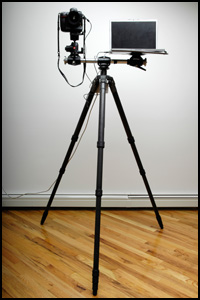
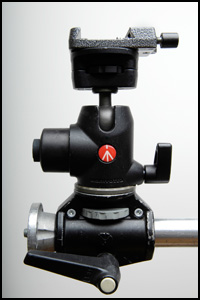
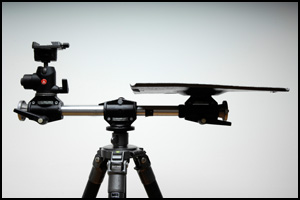
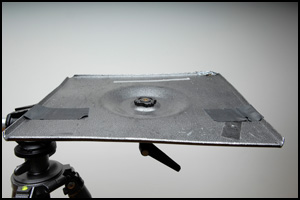













Thanks for sharing, it is always an advantage when you can get straight from the pro, I have always been a fan of your work.
Joe, first of all I loved your lighting course on line at Kelby training. Amazing stuff, a lot like following you around asking you questions while you were working and you now getting mad! Can we go another one on small flashes next?
Thanks for sharing the tripod setup secret. That was the first thing I asked Scott about.
I’m also very excited that you’ve started a blog.. welcome to the blogworld, we’ve been waiting patiently.
… not getting mad.
Great one, that helps me a lot. Thank you 🙂
By the way can somebody give me a alternative for the mentioned Nikon Camera Control Pro for Canon users? I am using the Eos Utility but it sucks.
So a third party product would be nice.
Thanks again… Mat
Joe,
Fabulous work.
I love the laptop support. I shoot tethered whenever I’m in the studio (not often enough), and although I have a second body available, it’s strictly a backup body. When the computer gets backed up with RAW files, I get the client/subject to come look at the files that are coming up on the screen. It gives everyone a chance to catch their breath and to think about changes/improvements we need to make as we continue shooting.
Love the blog. Can’t wait to read more.
Don
Joe,
As a NAPP member, Scott kelby blog reader, and amatuer photography enthusiast, I’m always looking to expand on my photography competencies.
I signed up for the annual subscription-based online training at kelbytraining.com, and want to tell you that I loved your light video courses.
Great stuff, really!!
I’m looking forward to you having a similar course with the SB-800 strobes, as that’s what I use (2 of them) at the moment with my D300.
Welcome to the blogosphere, and thanks for sharing your knowledge!
Ok…now thats cool.
Love the new book. Great ideas.
The blog is nice addition also.
One minor suggestion: Could you make the images larger after the jump. Currently look like !:!. Would be great to see more detail if we click.
Keep up great ideas.
The blog is great, YouTube channel too – thanks for delivering us with great content! Love your sense of humor 🙂
I appreciate that you’ve shared the laptop/camera combo with us, I first saw it on Nikon’s “Speed of Light” DVD and it seemed like a great idea (although I also tend to get too excited at times which puts my MacBook Pro’s USB port at risk, huh). Can’t help noticing that in the desert shoot there your laptop was also being held with some kind of a clamp (ball head was different as well) – is it just some basic hardware store thingie or a brand-name gadget by Gitzo/Manfrotto etc.? And do you feel safe to clamp down on laptop casing – as I understand, Macs are rather tightly packed inside? Do you use it only on location or in the studio as well?
Thanks for sharing, I searched all over the place for that setup after I saw the Nikon flash video.
Thanks again!
Thanks for the great advice, I saw the video featuring this setup on Kelby training and was wondering who made such a useful tripod head or if it might have been a custom piece of kit.
Looking forward to taking delivery of “the moment it clicks” book in the next few days, I ordered from Amazon on Tuesday. Never knew that you had a blog until I clicked through from the Nikonains blog. Time to get your RSS feed into my reader I think. Thanks for sharing in the tip Joe
Mat:
“By the way can somebody give me a alternative for the mentioned Nikon Camera Control Pro for Canon users? I am using the Eos Utility but it sucks.
So a third party product would be nice.”
I use DSLR Remote Pro from Breeze Systems. Works like a charm:
http://www.breezesys.com/DSLRRemotePro/index.htm
What happend to your “Magicball” seen in “Speed of light”? Why you’ve changed?
http://www.novoflex.de/english/html/tripod_heads_and_accessories.htm
Joe, I saw the video on Kelby and noticed that you had a second monitor, I have camera pro and was wondering how you got the single large display on the second monitor while on the laptop had nikon pro up.
Thanks
Dennis,
In the Mac OS, go to your System Preferences, then to the Displays panel. Make sure your external display is plugged into the computer and turned on, then click the Detect Displays button. The computer should detect the display and start using it. You can go into the Arrangement section and play around with mirroring (checkbox at the bottom) and mapping options.
In Windows, go to the Display Properties (I usually right-click on the Desktop and go to Properties), then to the Settings tab, and click the Advanced button. From there, I think it’s something under the Monitor tab maybe, but it’s been so long since I’ve dealt with dual monitors on a Windows machine I couldn’t say for sure. That’ll get you in the general area though.
On the Kelby video we have the monitors mirrored for illustrative purposes, but not here in the studio. Need the extra screen real estate for projects and the like. Hope this helps!
Brad
I should be careful what I wish for! Ever since I first saw it, I was curious about this tethered set up. But a quick price check had me looking for alternatives; I was hoping that I might be able to get away with Gitzo’s 3540XLS (not that it’s cheap by any stretch of the imagination). I called the friendly folks at Bogen for their counsel. Unfortunately (for my wallet), they said that if you’re going to have a computer and monitor being supported, you really need the 5-series Giant — not so much because of weight, but torque. On the bright side, they told me, if I bought two I could put a bar between them and do chin-ups, no problem!
Sir, like Many people I have enjoyed looking at your work. I have one question. First of all thank you for mentioning what you used in the Nikon Speed of Light. I would also like to know what stands you used for the speed lights and also I noticed that the speed lights were attached to the stand via clamps. Which clamp was it? Last but not the least, the large diffusing surface you used? Could you let me know the details on these items as well.
By the way just ordered your book. Have been waiting for it to come out since a long time. Finally am going to get my hands on it, soon.
Mohammed, those stands are Avenger A225SCB C-Stands (century stands) with Grip arms/clamp (part D520B & D200B). The clamps are Bogen/Manfrotto 175F “Justin” clamps. The diffusion panels are Lastolite Skylites. All of these products are distributed by Bogen in the US. You’ll see all of this in the book when it arrives. Enjoy!
He’s got a BOOK? I loved the DVD Speed of light..
I wasted my TIME and MONEY looking to build a system…and almost bought a bunch of pocket wizards….because I’ve heard that the SB800 set up was not totally reliable. I’ve only got 2 SB800’s…been playing with both, and not ONE problem (via D200 camera). So I’m very, VERY stoked!
Glad to join this blog and looking forward to more!!! YOU ROCK!
Joe, Looks like the crossbar part of your Tripod rig is no longer made by Manfrotto. What a bummer cause I really want one. (The Manfrotto accessory arm 3153B). All sites previously selling them say “No longer available from manufacturer” and no replacement is offered on the Manfrotto or Bogen websites. Rats! 🙁
The replacement crossbar support is called Manfrotto MN 131DDB. Retails for around £60-75 in the UK.
that gitzo laptop platform is relly beaten up, isnt it? it looks twisted or something. this combo is working too hard, Joe. Give it a break…send it to me.
Hi Joe, I suppose this would be the best to ask this question initially before finding another method.
I spent a better half of a morning researching shooting tethered with my Nikon D300 with a USB cable after reading your setup.
With the two links that you provided, the cables are not 2.0 rated, only 1.1 speeds. Are those the two cables you use? If so, is it that much slower than 2.0?
Belkin F3U139-10 Pro Series USB 4-Pin Mini-B Cable (10-Feet)
Belkin F3U134-10 USB Extension Cable (10-Feet)
Also, I’ve read about the general rule of thumb for USB extension “no more than 15 feet” – With the 20 feet of USB cable you have recommended been problematic?
Thanks!
Jason
Capturing this is the essence of what it’s all supposed to be about – well done!
Here is little more advanced variation I found on the setup.
http://www.shop.tethertools.com/Manfrotto-131DDB-Tripod-Accessory-Arm-4-Head-131DDB.htm
I was wondering if there were any coupons for the 131ddb or the gitzo g065 to be had?
Please fire them my way or post here!!!
I have a slik 330 tripod. Is there anyway i can get this set up with the tripod i have?
Hi, i think that i saw you visited my weblog so i came to “return the favor”.I am trying to find things to improve my site!I suppose its ok to use some of your ideas!!